Tuesday, January 27, 2015

ABAP TIP Remove and inactivate buttons in application toolbar


Chapter 081
Remove and inactivate buttons in application toolbar
Source : http://abapjoy.blogspot.com
Lets see how to remove and inactivate buttons in application toolbar.
I have added 3 buttons like below. First button will be showed normally, second button will be removed and third button will be inactivated.

Click the  in upper screen, and Application toolbar attributes popup will be opened.

Since I want to add a control to individual button, I click the Function selection.
I have choose the button to be inactivated.

Now, I have written the source code to remove and inactivate the buttons.

REPORT  zabap_001.

CALL  SCREEN 100.
*&---------------------------------------------------------------------*
*&      Module  STATUS_0100  OUTPUT
*&---------------------------------------------------------------------*
MODULE STATUS_0100 OUTPUT.
  DATA lt_exclude like TABLE OF sy-ucomm.

  APPEND 'REMOVE' TO lt_exclude,
           'INACTIVE' TO lt_exclude.

  SET PF-STATUS 'STATUS100' EXCLUDING lt_exclude.


ENDMODULE.                 " STATUS_0100  OUTPUT

If you execute the program, you will be able to see that RMOVE button is removed and the INACTVIE button is inactivated.


ABAP TIP – Debugging : Breakpoint At function


Chapter 080
ABAP TIP DEBUGGER : Breakpoint At function
Source : http://abapjoy.blogspot.com

There are helpful function in ABAP debugger like below.

l  Breakpoint at Statement
l  Breakpoint at Subroutine
l  Breakpoint at Function Module
l  Breakpoint for Method
l  Breakpoint at Exception
l  Breakpoint at Source Code

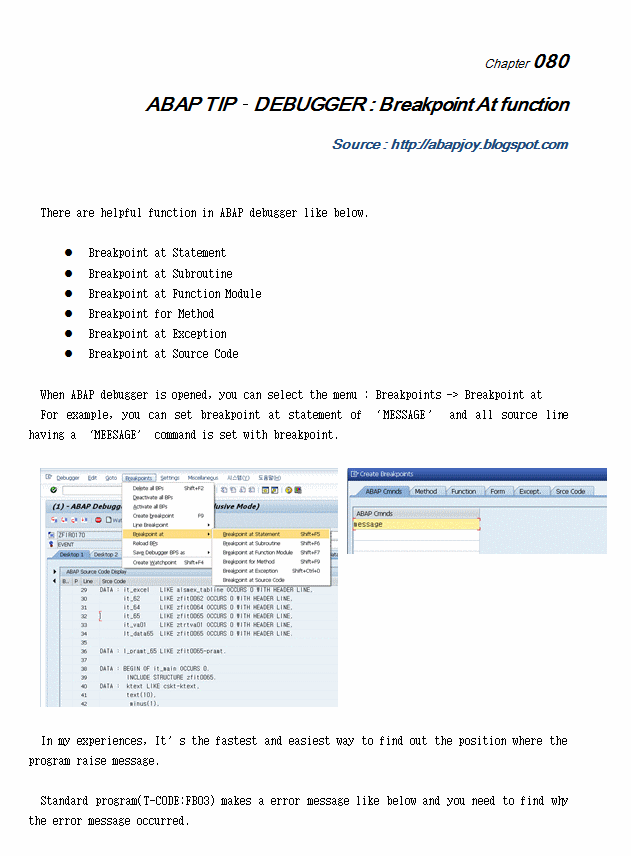
When ABAP debugger is opened, you can select the menu : Breakpoints -> Breakpoint at
For example, you can set breakpoint at statement of MESSAGE and all source line having a MEESAGE command is set with breakpoint.


In my experiences, Its the fastest and easiest way to find out the position where the program raise message.

Standard program(T-CODE:FB03) makes a error message like below and you need to find why the error message occurred.

Input the /h in the command field and execute program by enter or other way.

Set the breakpoint at statement and input MESSAGE.

Execute with F8 and the program will be stopped when error occur.
Then, you can know the program name and line in source code.


Monday, January 26, 2015

ABAP TIP-Setting the debugging point at the count you want.


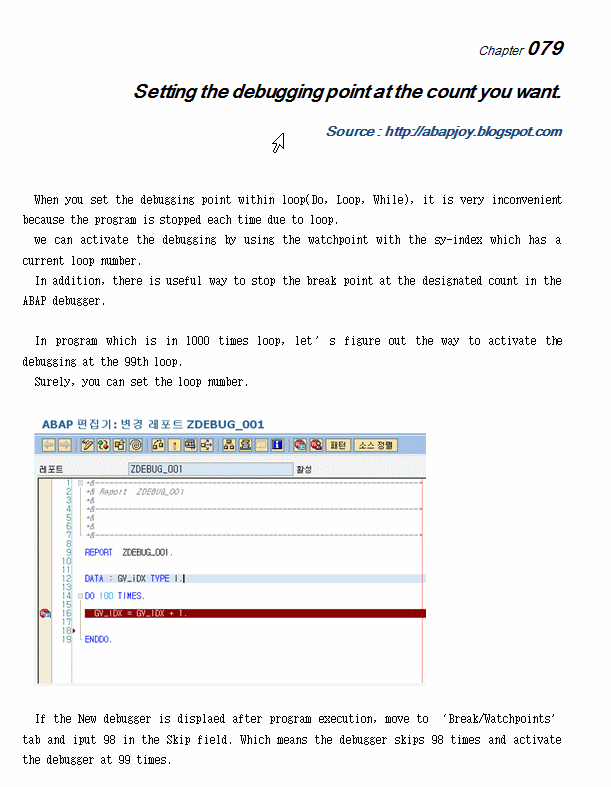
When you set the debugging point within loop(Do, Loop, While), it is very inconvenient because the program is stopped each time due to loop.
we can activate the debugging by using the watchpoint with the sy-index which has a current loop number.
In addition, there is useful way to stop the break point at the designated count in the ABAP debugger.

In program which is in 1000 times loop, lets figure out the way to activate the debugging at the 99th loop.
Surely, you can set the loop number.


If the New debugger is displaed after program execution, move to Break/Watchpoints tab and iput 98 in the Skip field. Which means the debugger skips 98 times and activate the debugger at 99 times.

Move to Deskptop again and press , you would be able to see that the debugger is activated after skipping 98 times.


ABAP Tip-SRDEBUG(Debugging with external environment)


Chapter 078
SRDEBUG(Debugging with external environment)
Source : http://abapjoy.blogspot.com

We sometimes meet the situation, which is need to check the data passed from the external environment(JAVA, C programs..). SBDEBUG tools enables us to work on a ABAP debugger when ABAP program is called by external program via interface.

First of all, you should change the SAP IDs User Type to A Dialog. Generally, The id for external access is set to C:Commnuicationts Data'.
[Figure 1 Maintain User Change User Type]

[Figure 1] T-CODE:SU01 can change the user information, It could be different with the SAP version.

And move to RFC(Remote Function Call) function in T-CODE:SE37 and set a External Breakpoint. You can chose the  icon in application toolbar.
External Breakpoint activate debugging with same ID logged in SAP. That is, If ABC01 id is logged in server pc, debugging would be activated with all PC.

[Figure 2 set a external breakpiont]

Now, perform T-CODE:SRDEBUG to activate external debug function. If you execute SRDEBUG, the popup screen will open like [figure 3]. Leave the default value and just click the  icon.

[Figure 3 SRDEBUG activation]

You can see the popup message and external debugging start to be activated.
When program from external environment(JAVA, C program), the call is moved to ABAP debugger. IF you want to stop the debugging, just click Yes in popup screen.


Friday, January 23, 2015

SAP TIP-Difference between sy-datum& sy-datlo


Chapter 077
Difference between sy-datum& sy-datlo
Source : http://abapjoy.blogspot.com

When we write the system data, we often use the sy-datum filed which is  the component of SYST structure. As  you know, syst-datum and sy-datum have a same value because two variables is linked with alias.
Sy-datum and sy-datlo all contain system date. Whats the difference between two system date fields? (this is the same case with sy-uzeit and sy-timlo which contain the system time value)

When user log in SAP system, the basic system information like system date is saved in SYST variable. In this case, user profile information is also saved into system variable SY-ZOLNO. The standard time zone is settled in IMG, T-CODE:SPRO에서 General Settings -> Time Zones -> Maintain System Settings.
 
[Figure1, Time Zone IMG setting]

There are two kinds of Time zone.
First system time zone means the time zone of application sever.
Second system time zone is users default time zone.
For example, Korea use the UTC+9 which is 9 hours faster than Greenwich Time zone.

[Figure 2. Time Zone setting detail]

Users Default Time Zone is linked with Person Time zone of User profile.
If there isnt time zone in user profile level, The users default time zone[Figure 2] in IMG should be used.
[Figure 3. User profile Personal Time Zone setting]

If user input the Personal Time zone, the user use the this Time zone as default.
Lets go back to the first topic.
SY-DATUM system variable is set with System Time zone in IMG.
SY-DALTO system variable is set with the Users Time Default Time of IMG or Time zone of User profile.

If Koreas branch located in china, China users should the SY-DALTO to express their local time.

Thursday, January 22, 2015

ABAP Tip-Download smartform graphic to PC

Chapter 076
Download smartform graphic to PC
Source : http://abapjoy.blogspot.com


If you upload the graphic via t-code:SE78, the file is saved in BDS(Business Document Service). BDS enables us to manage the integrated document system in R/3 system. The program which can manage the server document is BDN(Business Document Navigator). BDN interface provides the functions like displaying, creation, deletion of document.

There is a way to download the graphic registered from SE78.

You can make it with the below 3 steps.


1. GET file from BDS.
CALL FUNCTION 'SAPSCRIPT_GET_GRAPHIC_BDS'

2. Change file format to Bitmap.
CALL FUNCTION 'SAPSCRIPT_CONVERT_BITMAP '

3. Download the file to Local PC
CALL FUNCTION 'WS_DOWNLOAD'


The full program source is from SCN site.
*&---------------------------------------------------------------------*
*& Report  Z_EXPORT_GRAPHIC_FROM_SE78                                  *
*&                                                                     *
*&---------------------------------------------------------------------*
*&   This program exports logos from SE78 to a pc file in .bmp format  *
*&                                                                     *
*&---------------------------------------------------------------------*

REPORT  z_export_graphic_from_se78    .

*
*-----------------------------------------------------------------------
* Description: This program extracts graphic logos from the BDS and
*              saves it as a .bmp file on the pc.  Transaction SE78
*              does not provide a way to export logos.
* Author     : Keerthi Hiremath
* Date       : 15JAN2003
* Request    :
* Design doc :
*
*
*-----------------------------------------------------------------------
*                 M O D I F I C A T I O N    L O G
*-----------------------------------------------------------------------
*-----------------------------------------------------------------------
*@DAT                         D A T A
*-----------------------------------------------------------------------
TYPE-POOLS: sbdst .
DATA : git_content TYPE sbdst_content.
DATA : git_rawdata TYPE w3mime OCCURS 0,
       g_bitmaptypeout TYPE c.
DATA : BEGIN OF git_bitmap OCCURS 0,
             line(1000),
       END   OF git_bitmap.
DATA : g_bytecount TYPE i.
*-----------------------------------------------------------------------
*@SSL             S E L E C T I O N   S C R E E N
*-----------------------------------------------------------------------
SELECTION-SCREENBEGIN OF BLOCK b01 WITH FRAME TITLE text-b01.
PARAMETERS      : p_obj LIKE stxbitmaps-tdobject DEFAULT 'ZOGLGRPOBJ',
                  p_nam LIKE stxbitmaps-tdname,
                  p_id  LIKE stxbitmaps-tdid DEFAULT 'ZC',
                  p_ref LIKE stxbitmaps-tdbtype DEFAULT 'BMON'.
SELECTION-SCREENEND   OF BLOCK b01.
SELECTION-SCREENBEGIN OF BLOCK b02 WITH FRAME TITLE text-b02.
PARAMETERS      : p_file LIKE rlgrap-filename.
SELECTION-SCREENEND   OF BLOCK b02.
*-----------------------------------------------------------------------
*@INI                 I N I T I A L I Z A T I O N.
*-----------------------------------------------------------------------
INITIALIZATION.
*

*-----------------------------------------------------------------------
*@SOS             S T A R T   O F   S E L E C T I O N
*-----------------------------------------------------------------------
START-OF-SELECTION.
*
  PERFORM sapscript_get_graphic_bds.
  PERFORM sapscript_convert_bitmap.
  PERFORM ws_download.
*
*-----------------------------------------------------------------------
*@EOS                E N D   O F   S E L E C T I O N
*-----------------------------------------------------------------------
END-OF-SELECTION.
*

*-----------------------------------------------------------------------
*@TOP                   T O P   O F   P A G E
*-----------------------------------------------------------------------
TOP-OF-PAGE.
*

*-----------------------------------------------------------------------
*               A T   S E L E C T I O N   S C R E E N
*-----------------------------------------------------------------------
AT SELECTION-SCREEN ON VALUE-REQUEST FOR p_nam.
*
  DATA: l_return TYPE i.
  RANGES: r_obj FOR stxbitmaps-tdobject.
  DATA: l_bitmaps TYPE TABLE OF stxbitmaps WITH HEADER LINE.
  DATA: lit_scrfields TYPE TABLE OF dynpread WITH HEADER LINE.
*
  r_obj-sign = 'I'.
  r_obj-option = 'EQ'.
  r_obj-low = 'ZOGLGRPOBJ'.
  APPEND r_obj.
*
  CALL FUNCTION 'SAPSCRIPT_SEARCH_GRAPHIC_BDS'
    EXPORTING
      selection_screen         = 'X'
      select_entry             = 'X'
      selection_show           = 'X'
    IMPORTING
      e_object                 = p_obj
      e_id                     = p_id
      e_name                   = p_nam
      e_btype                  = p_ref
    TABLES
      t_objects                = r_obj
*    T_IDS                    = R_IDS
*    T_BTYPES                 = R_REFS
      t_selections             = l_bitmaps
    EXCEPTIONS
      nothing_found            = 1
      selection_canceled       = 2
      internal_error           = 3
      OTHERS                   = 4
            .
  IF sy-subrc <> 0.
* MESSAGE ID SY-MSGID TYPE SY-MSGTY NUMBER SY-MSGNO
*         WITH SY-MSGV1 SY-MSGV2 SY-MSGV3 SY-MSGV4.
  ELSE..
    lit_scrfields-fieldname = 'P_ID'.
    lit_scrfields-fieldvalue = p_id.
    APPEND lit_scrfields.
    CALL FUNCTION 'DYNP_VALUES_UPDATE'
      EXPORTING
        dyname                     = 'Z_EXPORT_GRAPHIC_FROM_SE78'
        dynumb                     = '1000'
      TABLES
        dynpfields                 = lit_scrfields
*     EXCEPTIONS
*       INVALID_ABAPWORKAREA       = 1
*       INVALID_DYNPROFIELD        = 2
*       INVALID_DYNPRONAME         = 3
*       INVALID_DYNPRONUMMER       = 4
*       INVALID_REQUEST            = 5
*       NO_FIELDDESCRIPTION        = 6
*       UNDEFIND_ERROR             = 7
*       OTHERS                     = 8
              .
    IF sy-subrc <> 0.
* MESSAGE ID SY-MSGID TYPE SY-MSGTY NUMBER SY-MSGNO
*         WITH SY-MSGV1 SY-MSGV2 SY-MSGV3 SY-MSGV4.
    ENDIF.

  ENDIF.

*
*-----------------------------------------------------------------------
*@FOR                          F O R M S
*-----------------------------------------------------------------------
*
*
*&---------------------------------------------------------------------*
*&      Form  SAPSCRIPT_GET_GRAPHIC_BDS
*&---------------------------------------------------------------------*
*       text
*----------------------------------------------------------------------*
*  -->  p1        text
*  <--  p2        text
*----------------------------------------------------------------------*
FORM sapscript_get_graphic_bds.
*
  CALL FUNCTION 'SAPSCRIPT_GET_GRAPHIC_BDS'
       EXPORTING
            i_object       = p_obj
            i_name         = p_nam
            i_id           = p_id
            i_btype        = p_ref
       IMPORTING
            e_bytecount    = g_bytecount
       TABLES
            content        = git_content
       EXCEPTIONS
            not_found      = 1
            bds_get_failed = 2
            bds_no_content = 3
            OTHERS         = 4.
  IF sy-subrc <> 0.
* MESSAGE ID SY-MSGID TYPE SY-MSGTY NUMBER SY-MSGNO
*         WITH SY-MSGV1 SY-MSGV2 SY-MSGV3 SY-MSGV4.
  ENDIF.
*
ENDFORM.                    " SAPSCRIPT_GET_GRAPHIC_BDS

*&---------------------------------------------------------------------*
*&      Form  SAPSCRIPT_CONVERT_BITMAP
*&---------------------------------------------------------------------*
*       text
*----------------------------------------------------------------------*
*  -->  p1        text
*  <--  p2        text
*----------------------------------------------------------------------*
FORM sapscript_convert_bitmap.
*                                                assign
  CALL FUNCTION 'SAPSCRIPT_CONVERT_BITMAP '
       EXPORTING
            old_format               = 'BDS'
            new_format               = 'BMP'
            bitmap_file_bytecount_in = g_bytecount
            itf_bitmap_type_in       = '*'
       IMPORTING
            bitmap_file_bytecount    = g_bytecount
            itf_bitmap_type_out      = g_bitmaptypeout
       TABLES
            bitmap_file              = git_rawdata
            bds_bitmap_file          = git_content
       EXCEPTIONS
            no_bitmap_file           = 1
            format_not_supported     = 2
            bitmap_file_not_type_x   = 3
            no_bmp_file              = 4
            bmperr_invalid_format    = 5
            bmperr_no_colortable     = 6
            bmperr_unsup_compression = 7
            bmperr_corrupt_rle_data  = 8
            bmperr_eof               = 9
            bdserr_invalid_format    = 10
            bdserr_eof               = 11
            OTHERS                   = 12.
  IF sy-subrc <> 0.
*   MESSAGE ID sy-msgid TYPE sy-msgty NUMBER sy-msgno
*           WITH sy-msgv1 sy-msgv2 sy-msgv3 sy-msgv4.
  ENDIF.
*
ENDFORM.                    " SAPSCRIPT_CONVERT_BITMAP

*&---------------------------------------------------------------------*
*&      Form  WS_DOWNLOAD
*&---------------------------------------------------------------------*
*       text
*----------------------------------------------------------------------*
*  -->  p1        text
*  <--  p2        text
*----------------------------------------------------------------------*
FORM ws_download.
*
  CALL FUNCTION 'WS_DOWNLOAD'
       EXPORTING
            bin_filesize            = g_bytecount
            filename                = p_file
            filetype                = 'BIN'
       TABLES
            data_tab                = git_rawdata
       EXCEPTIONS
            file_open_error         = 1
            file_write_error        = 2
            invalid_filesize        = 3
            invalid_type            = 4
            no_batch                = 5
            unknown_error           = 6
            invalid_table_width     = 7
            gui_refuse_filetransfer = 8
            customer_error          = 9
            OTHERS                  = 10.
  IF sy-subrc <> 0.
    MESSAGE ID sy-msgid TYPE sy-msgty NUMBER sy-msgno
            WITH sy-msgv1 sy-msgv2 sy-msgv3 sy-msgv4.
  ENDIF.
*
ENDFORM.                    " WS_DOWNLOAD